Blogger Widgets
Showing posts with label Android Operating System. Show all posts

Friday, 27 June 2014

Researchers Uncover Spying Tool Used by Governments to Hijack all Types of Smartphones #Hacking #Privacy #Spying #Hijacking #Surveillance


Purchasing malware to victimize people is illegal by laws but if the same thing any government official do, then its not!! Yes, the police forces around the World are following the footsteps of U.S. National Security Agency (NSA) and FBI.

Researchers from the Citizen Lab at the Munk School of Global Affairs at the University of Toronto and computer security firm Kaspersky Lab have unearthed a broad network of controversial spyware which is specially designed to give law enforcement agencies complete access to a suspect's phone for the purpose of surveillance.


The malware, dubbed as Remote Control System (RCS), also known as Da Vinci and Galileo, is developed by an Italian company known as Hacking Team, available for desktop computers, laptops, and mobile devices. The latest version of the malware works for all phone including Android, iOS, Windows Mobile, Symbian and BlackBerry devices, but best on Android devices, and can also be installed on jailbroken iOS devices. But even if the targeted iOS device is not jailbroken, the malware uses the famous Evasi0n jailbreaking tool to install the malware easily.

The team of researchers from both Citizen Lab and Kaspersky Lab in collaboration has presented their findings during an event in London. According to the report published, the diameter of the command infrastructure supporting Hacking Team, which sells the RCS to governments and law enforcement, is very vast with 326 command-and-control (C&C) servers running in more than 40 countries.

MALWARE DEVELOPERS - ‘HACKING TEAM’
Hacking Team is a Milan-based IT company with more than 50 employees that has made a totally different place for itself selling "offensive" intrusion and surveillance software to governments and law enforcement agencies in "several dozen countries" on "six continents."

It was a well-known fact for quite some time that the HackingTeam products included malware for mobile phones. However, these were rarely seen,” said Kaspersky Lab experts on the blog post. “In particular, the Android and iOS Trojans have never been identified before and represented one of the remaining blank spots in the story.”


Kaspersky Lab researchers have used a fingerprinting method to scan the entire IPv4 space and to identify the IP addresses of RCS Command & Control servers around the world and found the biggest host in United States with 64 counts of C&C servers. Next on the list was Kazakhstan with 49, Ecuador has 35, UK which hosts 32 control systems and many other countries with a grand total of 326 Command & Control servers.
"The presence of these servers in a given country doesn't mean to say they are used by that particular country's law enforcement agencies," said Sergey Golovanov, principal security researcher at Kaspersky Lab. "However, it makes sense for the users of RCS to deploy C&Cs in locations they control – where there are minimal risks of cross-border legal issues or server seizures."
RCS can be physically implanted on the victim’s device through a USB or SD card, and remotely it can be installed through spear phishing, exploit kits, drive-by downloads or network traffic injection.

Once installed on Apple iOS and Android device, the new module enable governments and law enforcement officers with larger capabilities to monitor victim devices, including the ability to:
  • control phone network
  • steal data from their device
  • record voice E-mail
  • intercept SMS and MMS messages
  • obtain call history
  • report on their location
  • use the device’s microphone in real time
  • intercept voice and SMS messages sent via applications such as Skype, WhatsApp, Viber, and much more.
"Secretly activating the microphone and taking regular camera shots provides constant surveillance of the target—which is much more powerful than traditional cloak and dagger operations," Golovanov wrote.
While, the Android module is protected by an optimizer for Android called DexGuard that made the it extremely difficult to analyze. However, most of the iOS capabilities mentioned above are also available for Android, along with the support for hijacking applications such Facebook, Google Talk, Tencent of China and many more.

The mobile modules for each are custom-built for each target, researchers said. From previous disclosures we have seen that RCS is currently being used to spy on political dissidents, journalists, human rights advocates, and opposing political figures.

Credited to: Hacker News Website
Sunday, 18 August 2013

Secret Codes For #Android Mobile Phones -Plus-Reasons to #Root Your Android Phone #AndroidOS


1. Complete Information about your Phone

*#*#4636#*#*
This code can be used to get some interesting information about your phone and battery.

2. Factory data reset

*#*#7780#*#*
This code can be used for a factory data reset. It'll remove following things:
Google account settings stored in your phone
System and application data and settings
Downloaded applications
It'll NOT remove:
Current system software and bundled application
SD card files e.g. photos, music files, etc.
Note: Once you give this code, you get a prompt screen asking you to click on "Reset phone" button. So you get a chance to cancel your operation.

3. Format Android Phone
*2767*3855#
Think before you give this code. This code is used for factory format. It'll remove all files and settings including the internal memory storage. It'll also reinstall the phone firmware.
Note: Once you give this code, there is no way to cancel the operation unless you remove the battery from the phone. So think twice before giving this code.

4. Phone Camera Update
*#*#34971539#*#*
This code is used to get information about phone camera. It shows following 4 menus:
Update camera firmware in image (Don't try this option)
Update camera firmware in SD card
Get camera firmware version
Get firmware update count
WARNING: Never use the first option otherwise your phone camera will stop working and you'll need to take your phone to service center to reinstall camera firmware.

5. End Call/Power
*#*#7594#*#*
This one is my favorite one. This code can be used to change the "End Call / Power" button action in your phone. Be default, if you long press the button, it shows a screen asking you to select any option from Silent mode, AirPlane mode and Power off.
You can change this action using this code. You can enable direct power off on this button so you don't need to waste your time in selecting the option.


6. File Copy for Creating Backup
*#*#273283*255*663282*#*#*
This code opens a File copy screen where you can backup your media files e.g. Images, Sound, Video and Voice memo.

7. Service Mode
*#*#197328640#*#*
This code can be used to enter into Service mode. You can run various tests and change settings in the service mode.

8. WLAN, GPS and Bluetooth Test Codes:
*#*#232339#*#* OR *#*#526#*#* OR *#*#528#*#* - WLAN test (Use "Menu" button to start various tests)
*#*#232338#*#* - Shows WiFi MAC address
*#*#1472365#*#* - GPS test
*#*#1575#*#* - Another GPS test
*#*#232331#*#* - Bluetooth test
*#*#232337#*# - Shows Bluetooth device address

9. Codes to get Firmware version information:
*#*#4986*2650468#*#* - PDA, Phone, H/W, RFCallDate
*#*#1234#*#* - PDA and Phone
*#*#1111#*#* - FTA SW Version
*#*#2222#*#* - FTA HW Version
*#*#44336#*#* - PDA, Phone, CSC, Build Time, Changelist number

10. Codes to launch various Factory Tests:
*#*#0283#*#* - Packet Loopback
*#*#0*#*#* - LCD test
*#*#0673#*#* OR *#*#0289#*#* - Melody test
*#*#0842#*#* - Device test (Vibration test and BackLight test)
*#*#2663#*#* - Touch screen version
*#*#2664#*#* - Touch screen test
*#*#0588#*#* - Proximity sensor test
*#*#3264#*#* - RAM version.


-10 Reasons to Root Your Android Phone-
1. Boost Your Phone's Speed and Battery Life
2. Flash a Custom ROM
3. Flash a Custom Kernel
4. Tweak the Dark Corners of Android
5. Remove Pre-installed Crap ware
6. Back Up Your Phone for Seamless Transitions
7. Block Ads in Any App
8. Truly Own Your Device
9. Automate Everything
10. Unlock Hidden Features and Install "Incompatible" Apps


Tuesday, 2 October 2012

Free Android USSD vulnerability protection from ESET now on Google Play

If you use an Android phone you may have heard of something called the USSD vulnerability. This allows a nasty piece of malicious software to reset your Android to its factory default settings and permanently delete your data. We will describe the USSD problem in more detail in a moment but first we want to let you know that, because this is a particularly unpleasant case of malware destroying information, ESET has provided a free app available from Google Play to protect your Android phone from this type of attack.
The app is called ESET USSD Control. According to Tibor Novosad, Head of Mobile Applications Section at ESET: “ESET USSD Control is an application that allows the user to check potentially malicious phone numbers (USSD codes) before they are dialed (executed) by the default phone dialer. ESET USSD Control will block malicious websites [that abuse USSD codes] as well. Checking for malicious codes before they are executed, ESET USSD Control makes sure all data on an Android phone stays safe.”

How does ESET USSD Control work?

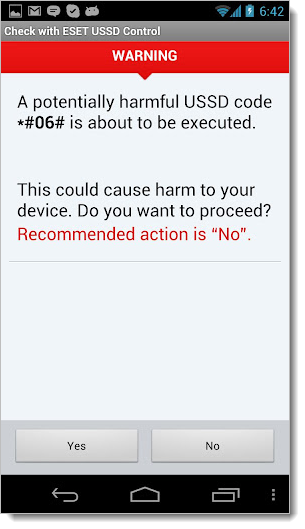
ESET USSD ControlThe app displays a warning window each time a malicious USSD code is found, blocking the execution of the command, as seen in the screenshot on the right.
In order to protect your Android smartphone from USSD attacks, you have to make sure that ESET USSD Control is set as the default dialer. Here’s how:
  1. Download ESET USSD Control from Google Play and install on your Android phone.
  2. Use your Android phone to visit our test page: http://www.eset.com/tools/ussdtest (note that this only contains a checker and will not make changes to your phone).
  3. When prompted to complete the action, select “Use by default for this action” and select ESET USSD Control.
Note that ESET only scans USSD code and does not store phone numbers.
We hope this app will help keep your Android safe. We’re pleased to make this available free to the Android community as part of our continuing effort to support the Android ecosystem and to empower users to stay safe on their mobile devices.

The Android USSD Vulnerability

USSD is a code used by phone manufacturers and carriers for simple customer support. The letters stand for Unstructured Supplementary Service Data (USSD). The code starts with an asterisk (*) and continues with hashtags or digits representing commands/data, then ends with a hashtag (#).  By entering these codes on your phone you can, for example, see your device’s IMEI (International Mobile Equipment Identity). The USSD code for this is *#06#. Other codes reveal different information or carry out actions, like a device reset.
The potential exists for a web page to instruct your phone to load a “tel:” URI (uniform resource identifier) with a special factory reset code inside an iframe. As Lucian Constantin at ComputerWorld reported, this attack was described by Ravishankar Borgaonkar, a research assistant in the Telecommunications Security department at the Technical University of Berlin, who demonstrated the remote data wiping attack during the Ekoparty security conference in Buenos Aires, Argentina.
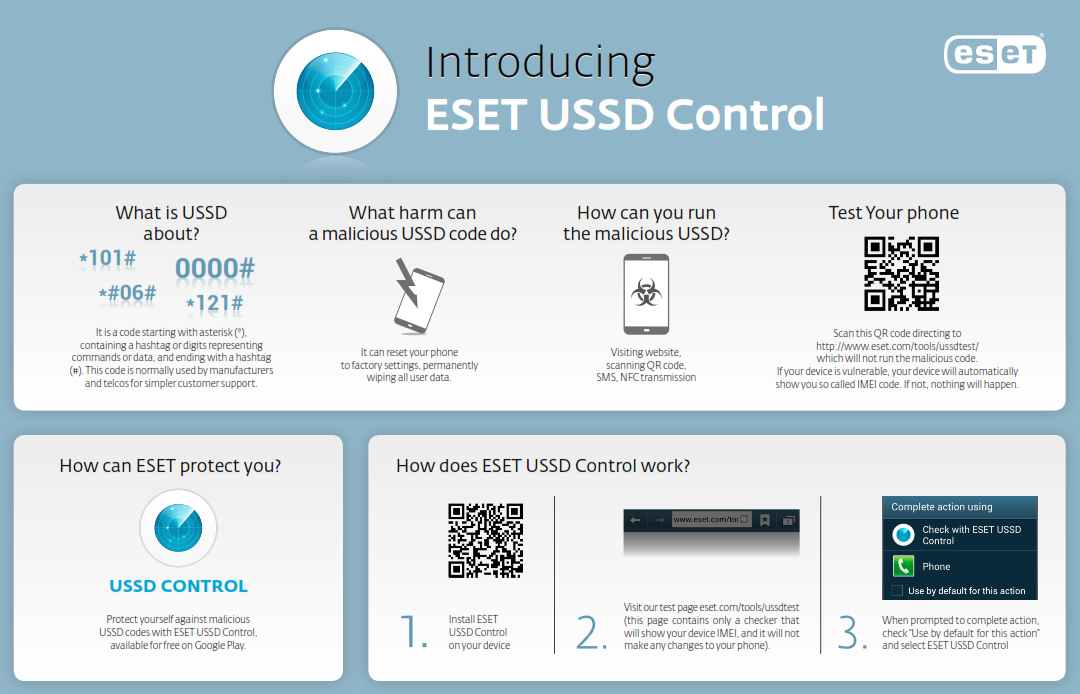
These malicious iframes could be placed on hacked websites or specially designed sites. As you probably know, there are numerous ways to trick your smartphone into going to a website, like QR codes or NFC chips (as my colleague Stephen Cobb illustrated in a short video). With ESET USSD Control on your Android you won’t need to worry that such tricks will be used to wipe your phone via USSD codes. For more about this problem, and ESET’s solution, check out the infographic (click for larger view):


ESET USSD Control for Android