Blogger Widgets
Showing posts with label Android. Show all posts

Sunday, 18 August 2013

Secret Codes For #Android Mobile Phones -Plus-Reasons to #Root Your Android Phone #AndroidOS


1. Complete Information about your Phone

*#*#4636#*#*
This code can be used to get some interesting information about your phone and battery.

2. Factory data reset

*#*#7780#*#*
This code can be used for a factory data reset. It'll remove following things:
Google account settings stored in your phone
System and application data and settings
Downloaded applications
It'll NOT remove:
Current system software and bundled application
SD card files e.g. photos, music files, etc.
Note: Once you give this code, you get a prompt screen asking you to click on "Reset phone" button. So you get a chance to cancel your operation.

3. Format Android Phone
*2767*3855#
Think before you give this code. This code is used for factory format. It'll remove all files and settings including the internal memory storage. It'll also reinstall the phone firmware.
Note: Once you give this code, there is no way to cancel the operation unless you remove the battery from the phone. So think twice before giving this code.

4. Phone Camera Update
*#*#34971539#*#*
This code is used to get information about phone camera. It shows following 4 menus:
Update camera firmware in image (Don't try this option)
Update camera firmware in SD card
Get camera firmware version
Get firmware update count
WARNING: Never use the first option otherwise your phone camera will stop working and you'll need to take your phone to service center to reinstall camera firmware.

5. End Call/Power
*#*#7594#*#*
This one is my favorite one. This code can be used to change the "End Call / Power" button action in your phone. Be default, if you long press the button, it shows a screen asking you to select any option from Silent mode, AirPlane mode and Power off.
You can change this action using this code. You can enable direct power off on this button so you don't need to waste your time in selecting the option.


6. File Copy for Creating Backup
*#*#273283*255*663282*#*#*
This code opens a File copy screen where you can backup your media files e.g. Images, Sound, Video and Voice memo.

7. Service Mode
*#*#197328640#*#*
This code can be used to enter into Service mode. You can run various tests and change settings in the service mode.

8. WLAN, GPS and Bluetooth Test Codes:
*#*#232339#*#* OR *#*#526#*#* OR *#*#528#*#* - WLAN test (Use "Menu" button to start various tests)
*#*#232338#*#* - Shows WiFi MAC address
*#*#1472365#*#* - GPS test
*#*#1575#*#* - Another GPS test
*#*#232331#*#* - Bluetooth test
*#*#232337#*# - Shows Bluetooth device address

9. Codes to get Firmware version information:
*#*#4986*2650468#*#* - PDA, Phone, H/W, RFCallDate
*#*#1234#*#* - PDA and Phone
*#*#1111#*#* - FTA SW Version
*#*#2222#*#* - FTA HW Version
*#*#44336#*#* - PDA, Phone, CSC, Build Time, Changelist number

10. Codes to launch various Factory Tests:
*#*#0283#*#* - Packet Loopback
*#*#0*#*#* - LCD test
*#*#0673#*#* OR *#*#0289#*#* - Melody test
*#*#0842#*#* - Device test (Vibration test and BackLight test)
*#*#2663#*#* - Touch screen version
*#*#2664#*#* - Touch screen test
*#*#0588#*#* - Proximity sensor test
*#*#3264#*#* - RAM version.


-10 Reasons to Root Your Android Phone-
1. Boost Your Phone's Speed and Battery Life
2. Flash a Custom ROM
3. Flash a Custom Kernel
4. Tweak the Dark Corners of Android
5. Remove Pre-installed Crap ware
6. Back Up Your Phone for Seamless Transitions
7. Block Ads in Any App
8. Truly Own Your Device
9. Automate Everything
10. Unlock Hidden Features and Install "Incompatible" Apps


Tuesday, 11 June 2013

6 Useful #Websites to Learn #coding as a #Beginner to #Expert.

image


#1. w3schools -
W3schools is number 1 as it helps beginners to learn
code from A to Z.
All You need to do is just go to W3schools and select a tutorial of the language you want to learn, then
take a cup of coffee and start learning.
No skills required.
You will learn > HTML/ CSS (HTML5/CSS3), Javascript, PHP, ASP, XML, AJAX, jQuery

image


#2. Codecademy -
Codecademy is a best alternative to W3schools,. with Codecademy you can learn any language and start programming in a funny way.
No skill required.
You will learn > HTML/CSS, PHP, jQuery, JavaScript, Python, Ruby

image


#3. Code avengers
Same as Codecademy, Code avengers provides an easy to use platform and its a funny way to code and gain experience.It comes with 3 Levels that a user have to pass them to become a full expert. No Skills Required
You will learn > HTML/CSS (HTML5/CSS3), JavaScript

image


#4. CodeSchool -
Codeschool provides you a very easy to use interface, Design, and not much unwanted text.
No skills required.Language you will learn > HTML/CSS, Ruby on Rails, JavaScript, iOS

image


#5. TeamtreeHouse -
Teamtreehouse is very similar to Codeschool which provides you simple and easy way to learn Coding.
No skills required. Languages you.Will learn HTML/CSS, iOS,. Android, Wordpress

image


#6. Dreamincode -
Last one is Dreamincode, many developers and programmers have taken their knowledge from Dreamincode.  The only thing is the interface is a bit boring and plenty of text as well.
No skill required Languages you will learn> C++, Java, VB, VB.net, C#, PHP, ColdFusion,
Thats it, Try these Sites to enhance your coding knowledge, Very usefull For beginners.

image

Tuesday, 2 October 2012

Free Android USSD vulnerability protection from ESET now on Google Play

If you use an Android phone you may have heard of something called the USSD vulnerability. This allows a nasty piece of malicious software to reset your Android to its factory default settings and permanently delete your data. We will describe the USSD problem in more detail in a moment but first we want to let you know that, because this is a particularly unpleasant case of malware destroying information, ESET has provided a free app available from Google Play to protect your Android phone from this type of attack.
The app is called ESET USSD Control. According to Tibor Novosad, Head of Mobile Applications Section at ESET: “ESET USSD Control is an application that allows the user to check potentially malicious phone numbers (USSD codes) before they are dialed (executed) by the default phone dialer. ESET USSD Control will block malicious websites [that abuse USSD codes] as well. Checking for malicious codes before they are executed, ESET USSD Control makes sure all data on an Android phone stays safe.”

How does ESET USSD Control work?

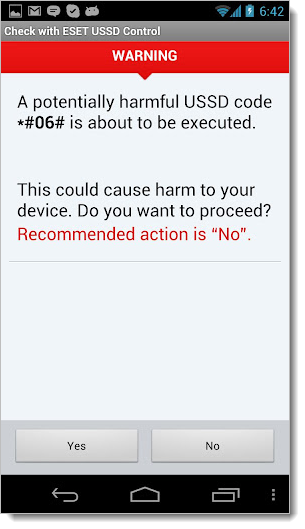
ESET USSD ControlThe app displays a warning window each time a malicious USSD code is found, blocking the execution of the command, as seen in the screenshot on the right.
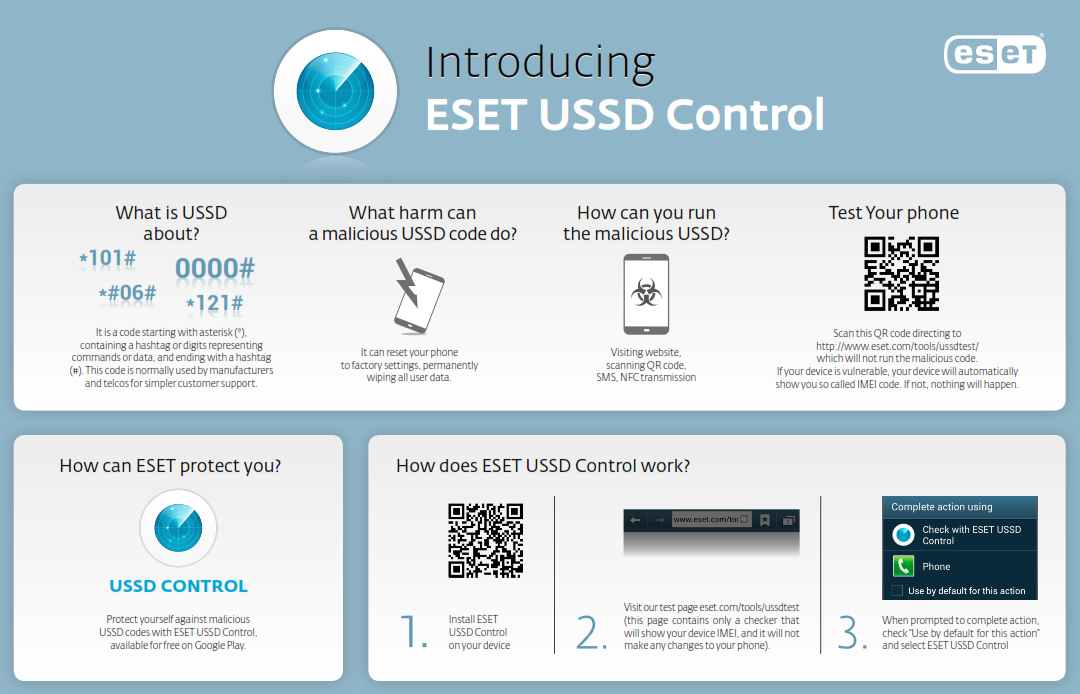
In order to protect your Android smartphone from USSD attacks, you have to make sure that ESET USSD Control is set as the default dialer. Here’s how:
  1. Download ESET USSD Control from Google Play and install on your Android phone.
  2. Use your Android phone to visit our test page: http://www.eset.com/tools/ussdtest (note that this only contains a checker and will not make changes to your phone).
  3. When prompted to complete the action, select “Use by default for this action” and select ESET USSD Control.
Note that ESET only scans USSD code and does not store phone numbers.
We hope this app will help keep your Android safe. We’re pleased to make this available free to the Android community as part of our continuing effort to support the Android ecosystem and to empower users to stay safe on their mobile devices.

The Android USSD Vulnerability

USSD is a code used by phone manufacturers and carriers for simple customer support. The letters stand for Unstructured Supplementary Service Data (USSD). The code starts with an asterisk (*) and continues with hashtags or digits representing commands/data, then ends with a hashtag (#).  By entering these codes on your phone you can, for example, see your device’s IMEI (International Mobile Equipment Identity). The USSD code for this is *#06#. Other codes reveal different information or carry out actions, like a device reset.
The potential exists for a web page to instruct your phone to load a “tel:” URI (uniform resource identifier) with a special factory reset code inside an iframe. As Lucian Constantin at ComputerWorld reported, this attack was described by Ravishankar Borgaonkar, a research assistant in the Telecommunications Security department at the Technical University of Berlin, who demonstrated the remote data wiping attack during the Ekoparty security conference in Buenos Aires, Argentina.
These malicious iframes could be placed on hacked websites or specially designed sites. As you probably know, there are numerous ways to trick your smartphone into going to a website, like QR codes or NFC chips (as my colleague Stephen Cobb illustrated in a short video). With ESET USSD Control on your Android you won’t need to worry that such tricks will be used to wipe your phone via USSD codes. For more about this problem, and ESET’s solution, check out the infographic (click for larger view):


ESET USSD Control for Android